
Mabinogi Lazy Patch: The Truth About Faster Updates, Unofficial Tools, and Safe Game Patching

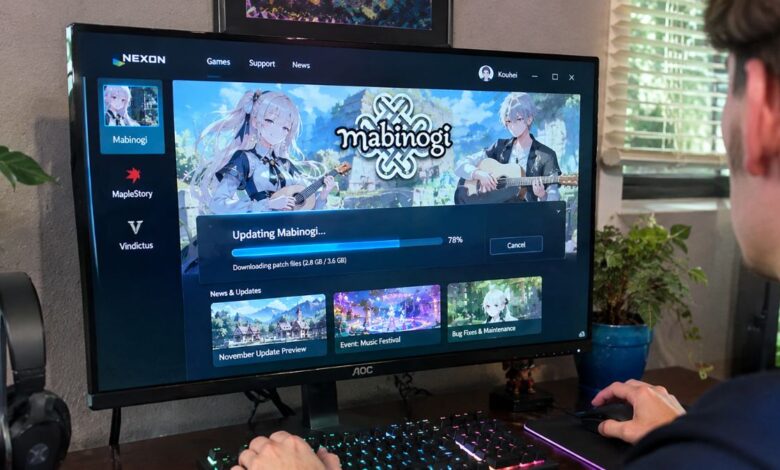
Mabinogi Lazy Patch refers to simplified game updates, alternative patching methods, and troubleshooting solutions for Mabinogi, the popular fantasy MMORPG published by Nexon. Players searching for this term often want to fix launcher errors, repair damaged game files, or complete updates more efficiently. However, Mabinogi Lazy Patch is not a clearly verified official Nexon feature, and third-party patching tools may introduce compatibility or security risks. Understanding how the official update system works, why patching problems occur, and which troubleshooting methods are reliable can help players maintain a stable gaming experience without unnecessarily compromising their installations or account security.
What Is Mabinogi Lazy Patch?
Mabinogi Lazy Patch is a term used in online discussions and guides to describe ways to simplify the update process for Mabinogi, the long-running fantasy MMORPG published by Nexon. Although some suggest it is a dedicated application or a built-in launcher setting, Nexon has not officially documented any product by this name.
The phrase is often associated with faster patch installation, alternative update utilities, and attempts to resolve launcher problems. However, its exact meaning varies between sources.
That distinction matters. Genuine third-party Mabinogi patching projects have existed, but that doesn’t mean a product called Lazy Patch is officially supported, currently maintained, or safe to install.
Understanding the difference between documented software and loosely defined terminology is the first step in avoiding unnecessary technical problems.
Understanding Mabinogi and Its Update System
Mabinogi is an online role-playing game set in a fantasy world where players develop characters through combat, crafting, music, exploration, and other activities.
Unlike traditional games that remain largely unchanged after release, an MMORPG depends on continuing server maintenance and client updates.
New content may require additional files, while bug fixes and technical revisions can modify existing components. Players must keep their local installations compatible with the version operating on the game servers.
Nexon’s official launcher manages this process for supported installations. Steam also provides an installation and update route for players accessing Mabinogi through that platform.
The process is designed to maintain compatibility, but players can run into incomplete downloads, corrupted files, interrupted installations, or launchers that fail to finish an update.
Such difficulties explain the practical interest in alternative patching methods.
A player who cannot launch the game is not necessarily looking for a modification. Often, the immediate need is simply a reliable way to restore a working installation.
Where Did the Mabinogi Lazy Patch Idea Come From?
The origins of the specific expression Mabinogi Lazy Patch are not firmly established in authoritative documentation.
Some independent articles describe it as informal community terminology for more efficient updating. However, primary evidence is insufficient to identify a particular creator, original release date, or universally accepted definition.
What can be documented is the existence of alternative patching projects developed outside Nexon’s official distribution system.
One example is Power Patcher, an independently developed Mabinogi client patcher whose source repository remains publicly accessible.
Its developer described functions involving patch versions, downloading files, and managing the game’s update process. Importantly, the repository also states that Power Patcher stopped working after changes to the patch process and would not receive further development.
Another project, mabi-patch-thing, was published as a script for downloading Mabinogi updates. Its documentation describes downloading patches, retrieving complete releases, and updating an existing installation.
These projects demonstrate that technical alternatives to the standard update workflow were developed.
They do not demonstrate that every modern download advertised as a lazy patch is legitimate or compatible with the current game.
That distinction matters especially when older software is circulated without its original documentation or development history.
How Does Game Patching Actually Work?
A game patch modifies an existing installation to match the software version required to keep playing.
The underlying process can involve several operations:
- Identifying the installed game version.
- Determining which updates are necessary.
- Downloading replacement or additional files.
- Applying changes to the installation.
- Checking whether required files are present and usable.
- Preparing the game client for launch.
Some software distribution systems use incremental updates, meaning they download only necessary changes rather than a full reinstall.
However, the exact methods a particular launcher uses can vary. Without current technical documentation, it would be misleading to claim that Mabinogi always performs a specific sequence of file comparisons or uses a particular optimization algorithm.
Updating and Repairing Are Different Operations
An update brings the game to a newer version. A repair checks an installation for missing or damaged files and restores those that need attention.
The two operations may download overlapping content, but they address different problems.
For example, a player might complete an update successfully but still encounter a startup error because a local file is corrupted.
In that case, downloading the same update through an unofficial utility may not solve the underlying issue.
Nexon specifically provides a repair installation function, making it a more appropriate first option when file integrity is suspected.
Why Players Look for Alternative Patchers
The appeal of an alternative patcher is straightforward: players want to spend less time troubleshooting and more time playing.
Yet slow or unsuccessful updates do not all have the same cause.
Download and Network Problems
An unstable internet connection can interrupt downloads or interfere with communication between the launcher and its update services.
A temporary connection problem may resolve after restarting the launcher or stabilizing the network.
Switching patching software without identifying the connection issue does not guarantee improvement.
Damaged or Missing Files
Game files can become incomplete because of interrupted installations, storage problems, or other system-level errors.
Repeated launch failures can indicate that important files require verification.
This is where supported repair tools become especially useful.
Launcher and Process Conflicts
A launcher can also encounter problems when an associated process stays active after the game closes.
Nexon’s Steam troubleshooting documentation identifies a situation involving the nxsteam.exe process and recommends ending that process, restarting Steam, or restarting the computer.
An active background process may explain certain update errors, although it shouldn’t be assumed to explain every failed patch.
Storage Limitations
Installing or repairing game files may require additional free disk space.
A system with insufficient available storage can fail to install updates even when the internet connection is working normally.
Checking basic system conditions before downloading another program is often the most efficient troubleshooting approach.
Is Mabinogi Lazy Patch Official or Safe?
No official Nexon documentation reviewed establishes Mabinogi Lazy Patch as the name of an approved patching utility.
Safety therefore depends on what a particular download actually contains, who created it, whether it remains maintained, and what it changes on the user’s computer.
An unfamiliar executable can introduce several risks.
File integrity risks: An incompatible patcher may replace, remove, or modify files incorrectly.
Security risks: Downloading executables from unverified websites can expose users to malicious software or deceptive installers.
Compatibility risks: A utility designed for an older game version may no longer understand the current update process.
Account risks: Some unauthorized modifications or third-party programs may violate Nexon’s rules.
Nexon has published explicit restrictions concerning third-party programs and modifications. Its support documentation states that certain detected programs can cause the game client to disconnect.
This does not establish that every historical alternative patcher automatically causes an account suspension. Nor does it establish that any specific program is permitted.
Players should not assume that an application is authorized merely because its developer claims it does not affect gameplay.
What Nexon’s Third-Party Software Policy Means
The distinction between a patching utility and a gameplay modification may seem obvious to a player.
A utility that downloads files performs a different function than a program that automates combat or manipulates game behavior.
Nevertheless, whether a tool is acceptable depends on the publisher’s applicable rules and its actual technical behavior.
In May 2016, Nexon announced enforcement measures against certain third-party programs and modifications affecting Mabinogi.
The company’s guidance addresses unauthorized changes to game software and the use of third-party software to access game files.
Players encountering related problems may need to remove modifications or restore a clean installation.
For this reason, software should not be classified as safe simply because it is described as a convenience tool.
The most defensible approach is to rely on official installation methods unless the publisher explicitly authorizes an alternative.
How to Fix Mabinogi Updates Using Official Methods
Players experiencing update failures can follow a systematic troubleshooting process without relying on unfamiliar executables.
Step 1: Restart the Game and Launcher
Close Mabinogi completely, exit the launcher, then reopen it.
If the application does not respond or an associated process remains active, use Windows Task Manager to check for a lingering process.
A full computer restart may resolve temporary process conflicts.
Step 2: Check the Internet Connection
Confirm that other online services are functioning and that the connection is reasonably stable.
If possible, avoid switching between unstable networks while a large update is being downloaded.
A wired connection can help eliminate some wireless connectivity problems.
Step 3: Repair Mabinogi Through Nexon Launcher
Nexon publishes an official procedure for restoring damaged or missing game files.
According to its support guidance:
- Open the Nexon Launcher.
- Navigate to the Mabinogi game page.
- Open the game’s settings using the gear icon.
- Choose Game Configuration.
- Select Mabinogi.
- Click Repair Installation.
- Confirm the operation and allow verification to finish.
The repair process checks the installation and downloads any files that need restoring.
Menu labels or their locations may change as the launcher receives updates.
Step 4: Verify the Installation Through Steam
Steam users can use its built-in file verification tool.
Open the Steam Library, right-click Mabinogi, and select Properties.
Find the file verification option under Installed Files or the corresponding game-file settings section, depending on the Steam interface version.
Select Verify Integrity of Game Files and allow the process to complete.
Steam will check the local installation and reacquire required files when necessary.
Step 5: Investigate Persistent Errors
If repair doesn’t resolve the issue, record the exact error message and note when the problem occurs.
For example, a download that repeatedly fails is a different problem from a game that patches successfully but cannot start.
Check available storage, review official maintenance announcements, and determine whether security software has flagged a legitimate launcher component.
Avoid turning off security protections indiscriminately.
If the problem continues, submit a support ticket to Nexon with the relevant error information and troubleshooting steps already completed.
The History of Official Mabinogi Launching
Understanding Mabinogi’s launcher history offers useful context for why alternative update solutions appeared.
In March 2017, Nexon announced that direct launching through the game’s executable would be discontinued as part of a move toward the Nexon Launcher.
The change was intended to consolidate game distribution, updates, and launching into a unified system.
This transition illustrates an important technical reality: installation and launching methods can change over the lifetime of an online game.
A utility developed for an earlier workflow may become incompatible after infrastructure or client changes.
Power Patcher’s developer later acknowledged this kind of problem, explaining that changes to the patching process made the tool unusable.
The broader lesson extends beyond Mabinogi.
A software download that worked reliably several years ago should not be assumed to work with a modern live-service game.
Can a Lazy Patch Improve Game Performance?
Claims that a patching shortcut automatically increases frame rates or eliminates gameplay lag need to be treated cautiously.
Update speed and gameplay performance are separate technical concerns.
A patcher’s primary function is to obtain and apply game files.
Frame rate, by contrast, depends on factors that may include graphics hardware, processor performance, graphics settings, drivers, and the game’s rendering workload.
Network latency introduces another set of variables.
Completing an update more efficiently does not necessarily change these conditions.
A legitimate game update may include performance improvements, but those benefits come from the changes it delivers, not the unofficial tool used to install it.
No verified performance figures show that a product called Mabinogi Lazy Patch consistently improves gameplay.
How to Evaluate Claims About Third-Party Patch Tools
Players searching for a faster installation method may encounter websites advertising downloads with impressive promises.
The credibility of those claims should be examined before any software is installed.
Several questions are especially useful:
- Is the developer clearly identified?
- Does the project have publicly available documentation?
- Is there evidence of recent maintenance and compatibility testing?
- Are the software’s functions explained precisely?
- Does it require unnecessary permissions or account credentials?
- Has Nexon explicitly approved the tool?
- Are performance claims supported by reproducible testing?
An open-source repository may make a project’s history easier to inspect, but public source code does not automatically prove that a compiled download is safe.
Likewise, a lack of reported problems does not equal formal authorization.
Software provenance matters more than promotional descriptions.
Why Clear Terminology Matters
One of the most revealing aspects of the Mabinogi Lazy Patch search term is the difference between documented technology and the language used to describe it.
Evidence suggests independently developed patching utilities existed. Official documentation explains repair procedures. A published policy also addresses unauthorized software.
What remains uncertain is whether Lazy Patch refers to a single, historically established utility or merely a broad label used by online guides.
Treating those possibilities as equivalent produces misleading information.
For players, precision leads to better decisions. Someone experiencing corrupted files needs a reliable repair process. Someone investigating old patching software needs compatibility information. Someone searching for faster downloads needs to understand the limitations of their connection and update system.
Those are three different situations, even when the same search phrase leads to them.
Conclusion
Mabinogi Lazy Patch is best understood as an ambiguous term connected to the desire for easier game updates, not as a verified official Nexon product.
Historical third-party patching projects demonstrate that developers have experimented with alternative ways to download and maintain Mabinogi installations. Their existence is documented, but compatibility, publisher authorization, and security cannot be assumed.
For players currently encountering patch errors, the most reliable starting point remains the official launcher, supported file verification tools, and Nexon’s troubleshooting guidance.
The important question is not whether a patcher promises to save time. It is whether the method is documented, compatible, authorized, and can restore the game without introducing additional problems.
(FAQs)
1. What does Mabinogi Lazy Patch mean?
Mabinogi Lazy Patch is an informal online term associated with convenient or alternative methods of updating Mabinogi. Nexon has no clearly documented official product with that exact name. Its meaning depends on the particular source or software being discussed.
2. Is Mabinogi Lazy Patch an official Nexon feature?
No official documentation reviewed confirms it as a dedicated Nexon feature or launcher option. Nexon provides its own update and installation repair functions through supported game distribution platforms.
3. Can Mabinogi Lazy Patch make game updates faster?
An alternative patching method might change how updates download or apply, but no independently verified benchmark shows a consistent speed advantage for a product under this name. Results depend on the tool, game version, network connection, and installation conditions.
4. Can using an unofficial Mabinogi patcher cause account problems?
Potentially. Nexon restricts certain third-party programs and modifications. Whether a particular tool violates applicable rules depends on its functionality and authorization. Players should avoid assuming that third-party patching software is permitted without confirmation.
5. What should I do if Mabinogi is stuck updating?
Start by restarting the launcher and checking your connection. Next, use Nexon’s Repair Installation function or Steam’s file verification feature. If the issue persists, check the exact error message and contact official Mabinogi Support rather than installing an unverified patcher.